A Beanstalk ISA is really quick and easy to set up. You can do it all in minutes within our app, and unlike some round up apps, there is no fixed monthly fee to use the app making the Beanstalk account a simple and affordable way to save and invest for yourself. You can find out more about a Beanstalk ISA here.
To open an ISA just follow the simple steps below.
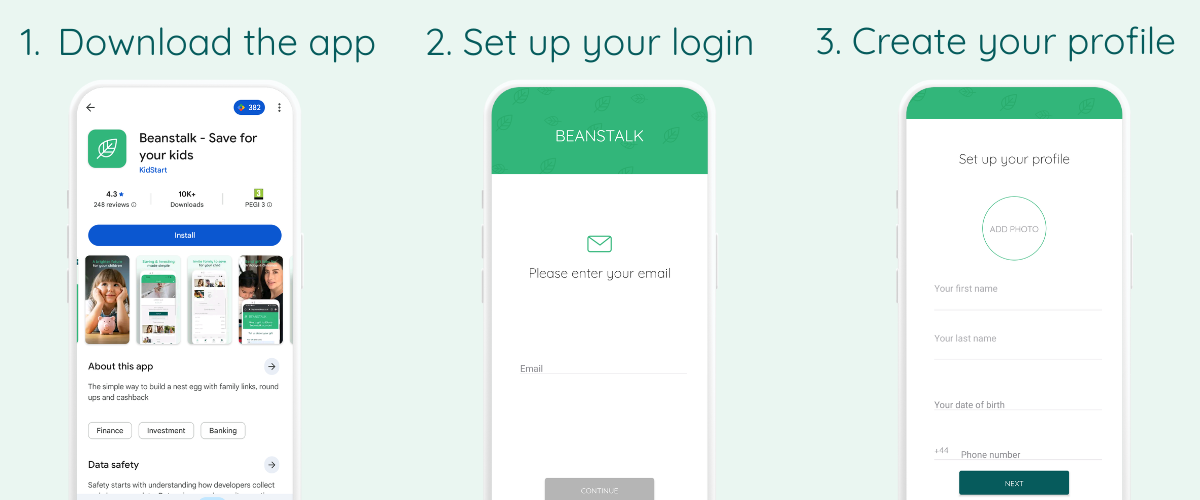 ISA steps
- Download the app - the first step is to download the free Beanstalk app on your mobile phone from either the Google Play Store or Apple App Store.
- Set up your login details - next enter your email address and click the link in the confirmation email to set up your login details.
- Create your profile - you do this by entering your name, email and home address.
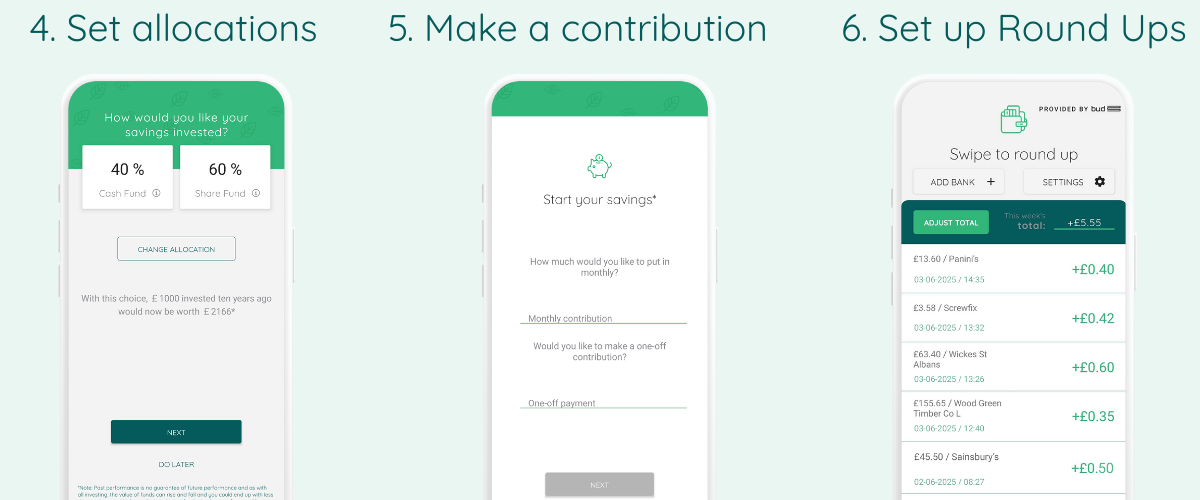 ISA steps
- Spply for an account - to start the process, just follow the simple steps to apply for an ISA, including choosing how you would like your savings invested.
- Make your first contribution - choose whether you would like to make a one-off top up or set up a regular monthly contribution.
- Set up Round Ups - once you’ve completed your application, you can enable Round Ups to automatically invest any spare change whenever you shop.
That’s it! All the information on your account is readily available in the app so it’s easy to manage your investments, make additional contributions and check how things are going.
Beanstalk makes it really easy to save for children too, take a look at how to open a Junior ISA here.